


History of sent emails
Chapter 17 — Manage messages and emails
Category: Manage messages and emails
Introduction
Plugin.ch keeps a complete history of all the bulk emails you have sent. This history lets you track your communications, check when emails were sent, and maintain a record of your messaging activity.
Find out how to access this history and view the details of your past mailings.
💡 Tip
The history is an excellent tool for auditing your communications. Check it regularly to make sure all your emails were sent correctly and to keep a record of your communication.
Accessing the email history
Open the MESSAGE menu
From the main dashboard, click the menu MESSAGE in the navigation bar.
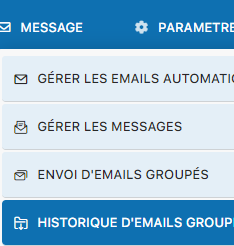
Select "BULK EMAIL HISTORY"
Click BULK EMAIL HISTORY to view the list of all your previous mailings.
History view
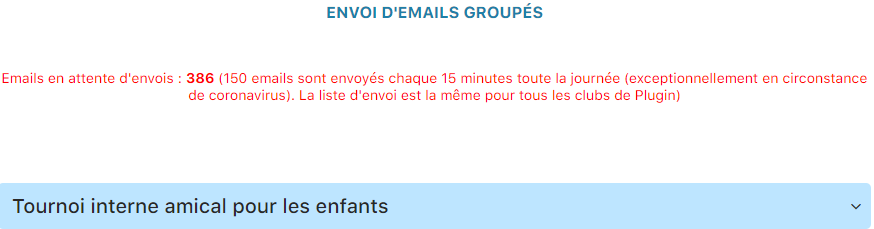
A list shows all the bulk emails you have sent, including:
- Date and time sent — When the email was sent
- Recipients — The targeted group or individuals
- Message subject — The email's title
- Sending status — Confirmation that the email was processed
Complete list of mailings:
About the sending server
⚠️ Server status message
A red message may appear in the history to inform you of the status of the shared email sending server. This informational message does not mean your emails were not sent, but that the server is currently under heavy load. The history remains reliable for auditing your mailings.
Key points
- The history is kept indefinitely
- Each mailing is logged with its date, recipients, and subject
- The history lets you check past communications
- It is a compliance and audit tool for your club
- Server status messages do not mean a sending failure
💡 Practical tips
- Check the history regularly to keep track of your communications
- Use it as a reference if a member reports not having received an email
- The history is useful for audits and reports
- Don't worry about red server status messages — your emails have been processed
Conclusion
The email history is a simple but powerful tool for managing and auditing your communications with members. Check it regularly to make sure all your emails were sent correctly and to keep a record of your messaging activity. It is an essential part of professionally managing your tennis club.
Plugin.ch Tutorial — Manage messages and emails