


Sending bulk emails
Chapter 17 — Manage messages and emails
Category: Manage messages and emails
Introduction
Plugin.ch lets you send targeted emails to specific groups of members. Whether you want to communicate with all members, a particular lesson group, or a specific subscription category, the bulk email feature offers complete flexibility.
Find out how to select your recipients, compose your message, and send targeted communications in just a few steps.
💡 Tip
Use group filtering to send relevant messages. For example, send a schedule change notification only to members enrolled in that lesson.
Send targeted emails
Access the bulk sending feature
From the MESSAGE, click BULK EMAIL SENDING to access the targeted sending interface.
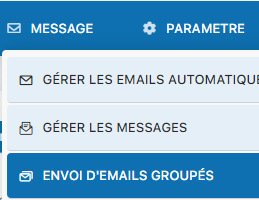
Access the sending interface
You arrive at the bulk email composition page with all the available settings.
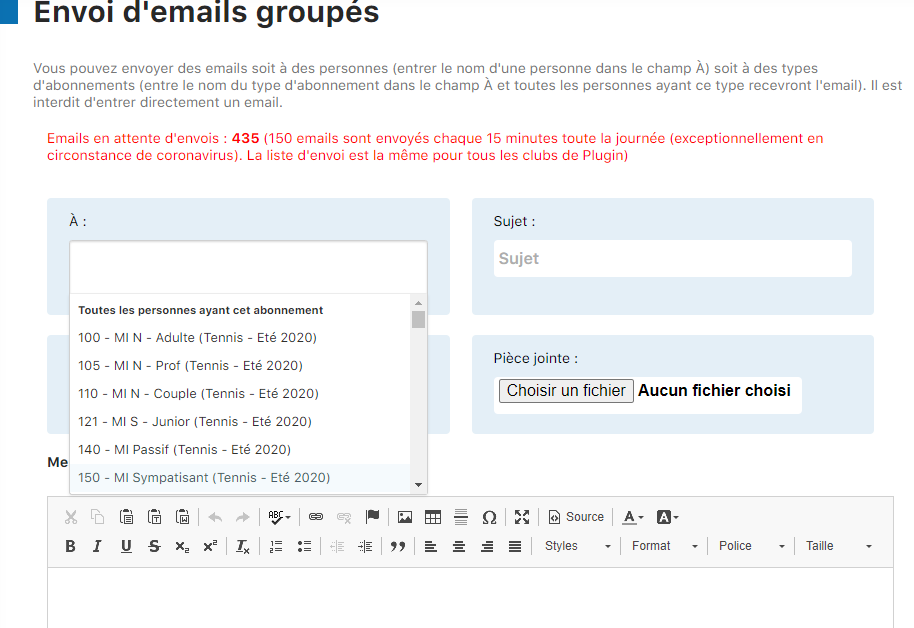
Complete sending interface
Overview of all the fields available to configure and send your bulk email.

Selecting recipients
Click in the field "To:" to open the recipient selection options. Plugin.ch offers several filtering criteria:
- By subscription type — Select members with a specific subscription type (for example, all "Basic" or "Premium" subscribers)
- By lesson group — Target members enrolled in a specific lesson or group
- Individual member from the list — Manually choose specific members from the full list
- By member group — Use predefined groups (if available) for quick targeting
- All members — Send to your entire member base
Composing your email
Available fields:
- Recipients (To:) — Select your target audience
- Subject — Enter your email's subject (visible in the inbox)
- Attachment (optional) — Attach a document or file if needed
- Message body — Write the main content of your email
Sending your email
Complete all fields
Make sure the recipients are selected and the subject and message are filled in.
Click "Send bulk emails"
Once all the settings are configured, click the button "Send bulk emails" to send your message to all selected recipients.
About the sending server
ℹ️ Important information
Plugin.ch uses an email sending server shared with other clubs. Occasionally, you may see warning messages about the server's status. These informational messages simply indicate that the server is currently handling a high volume of emails. Your emails will still be sent correctly.
💡 Practical tips
- Preview your email before sending to check the formatting
- Test the sending with a small group before targeting all your members
- Avoid sending too many bulk emails in a short period
- Use clear, descriptive subjects to improve the open rate
Conclusion
The bulk email feature is a powerful tool for communicating effectively with your members. Thanks to flexible filtering options and an intuitive interface, you can send relevant, targeted messages. Don't forget to check the recipients before sending to make sure your message reaches the right audience.
Plugin.ch Tutorial — Manage messages and emails